My Current Homelab Architecture
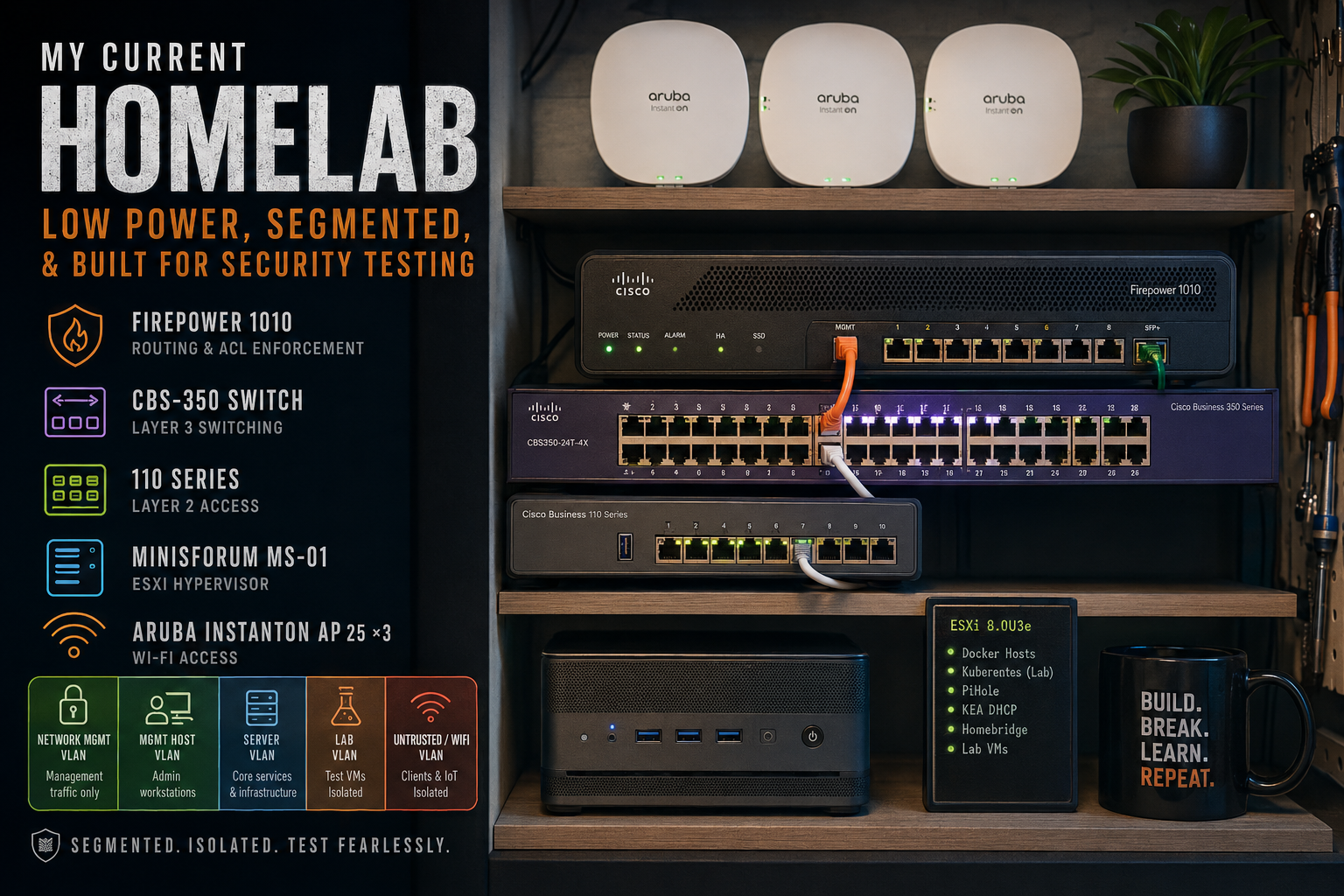
Hardware
- Cisco Firepower 1010 — Firewall / router
- Cisco CBS-350 — Layer 3 managed switch
- Cisco Business 110 Series — Layer 2 unmanaged
- Minisforum MS-01 — Hypervisor
- Aruba InstantOn AP 25 ×3 — Wireless
Why This Stack
I’ve run everything from consumer gear to full enterprise rack setups over the years, and the current stack sits somewhere in the middle. The goal wasn’t to build the most powerful lab possible — it was to build something reliable, segmented, low-maintenance, and small enough that I don’t resent the power bill.
The Firepower won out over alternatives like pfSense and OPNsense mostly because I already had the hardware and prefer having routing and policy enforcement on a dedicated appliance rather than virtualized. The ACL model is also significantly cleaner than what I was doing previously on the switch.
The CBS-350 and Aruba gear landed for similar reasons. UniFi absolutely serves a purpose and I’ve run plenty of it over the years, but I consistently found myself running into limitations around logging, visibility, and feature depth that Cisco and Aruba handle without much complexity.
For virtualization, ESXi is still the platform I’ve had the best long-term experience with. I gave Proxmox a legitimate shot after the Broadcom acquisition and ran into enough reliability issues that I eventually moved back. With Broadcom reintroducing a free ESXi tier, there wasn’t much reason for me not to.
KEA DHCP replaced ISC DHCP primarily because ISC DHCP is effectively end-of-life, while KEA gives me significantly more flexibility than the lightweight DHCP implementations built into most routers and firewalls.
Architecture
My homelab has been very iterative over the years. I’ve had everything from rack-mounted PowerEdges, switches, and full enterprise-grade hardware, to consumer gear, to prosumer Ubiquiti-based setups.
The current stack is built around two priorities: low power draw and small form factor. Most of it fits in a closet and costs very little to run — a significant change from the rack-mounted days.
The two most critical pieces are the Firepower and the Hypervisor. The Firepower is effectively operating as a router-on-a-stick, hosting the default gateway for each of my VLANs. I had that role on the CBS-350 for a while, but the ACL logic on the Firepower is far superior — not surprising, but worth saying out loud.
The Hypervisor
The MS-01 is running ESXi (8.0U3e). I gave Proxmox a fair shot shortly after the Broadcom acquisition and ran into some remarkably inconvenient stability issues, so I eventually moved back to ESXi once Broadcom reintroduced a free tier. I used to source licensing through VMUG — and the membership still has other benefits — but it’s no longer strictly necessary now.
The Firepower 1010 is currently running FTD with local management rather than FMC.
Within ESXi I run a mix of things: VMs hosting Docker containers, a small test Kubernetes cluster, PiHole, KEA DHCP, and lab VMs (domain controllers, Windows boxes) as needed.
Homebridge gets its own mention here. If you’ve spent any time trying to get third-party hardware into HomeKit, you already know why it exists. Apple’s ecosystem is polished right up until your device isn’t on the approved list, which describes most devices.
The Lab Environment
Where the homelab earns its keep from a security standpoint is the lab environment. I maintain a set of Ansible-managed VM templates that let me spin up and tear down test targets on demand — the Lab VLAN is isolated by design for exactly this reason.
The primary use case is validating techniques and tooling before they get anywhere near a real environment: AMSI bypasses, Defender bypasses, local privilege escalation, and anything new I’ve come across that I want to understand more deeply before using in production.
Depending on what I’m testing, the VLAN can be internet-only, completely air-gapped, or somewhere in between. There’s a real difference between reading a write-up and actually running the thing.
Security Philosophy
My primary goal isn’t to recreate an enterprise datacenter at home. It’s to create an environment where I can safely validate tooling, test assumptions, and break things (and subsequently fix them) to learn without creating an outage.
The lab exists specifically so experimentation stays isolated. Inter-VLAN access is generally handled through a default-deny approach with explicit allow rules where communication is actually required. Depending on what I’m testing, the lab can be internet-only, fully isolated, or selectively allowed to communicate with specific internal services.
Ansible and Disposable Infrastructure
Most of the lab VMs are treated as disposable infrastructure. Golden images are configured once, generalized, and then rebuilt through Ansible rather than manually maintained over time.
The workflow makes it easy to rapidly stand up domain-joined Windows systems, testing targets, or isolated application stacks depending on what I’m validating. Snapshotting is used heavily before testing anything destructive or unstable, and entire environments can be rebuilt fairly quickly if something goes sideways.
Within ESXi, VLAN separation is handled through port groups mapped back to the Firepower for policy enforcement.
The current datastore setup is local-only — similar to backups, that’s an area with room for improvement, but adding proper shared storage or backup infrastructure becomes difficult to justify once power, noise, cost, and physical space all enter the equation.
Backups are admittedly still an area with room for improvement. Right now most storage is local-only, largely because adding proper redundancy or shared storage starts to work against the low-power and small-form-factor goals of the environment.
Network Segmentation
The network is broken into five VLANs, all routing L2 through the CBS-350 and L3 through the Firepower where policy is applied.
The general ACL logic allows the management and server networks outbound access depending on need. The lab VLAN is effectively internet-only or fully local depending on what I’m testing.
The untrusted VLAN hosts workstations, WiFi clients, and smart home devices — it doesn’t touch anything else. The one exception is PiHole: the untrusted VLAN can reach it for DNS, which lets me block ads across the network without punching a broader hole.
DHCP runs on KEA, with a dedicated interface on each VLAN rather than relying on IP helper. It keeps DHCP behavior predictable and removes one more dependency on the switch configuration.
WiFi
The Arubas host a semi-meshed WiFi configuration — two are running PoE, and the third is off in a corner of the house connected via WiFi mesh since running ethernet there was never going to happen.
They’re incredibly easy to get online, which is underappreciated in the access point space. Within the InstantOn app you get decent client health metrics, built-in mesh support, and the ability to do some light application category blocking at the edge if you want it — though I could push most of that enforcement down to the firewall anyway.
There’s also some VLAN capability within the InstantOn family that I’ve used on and off for management access separation.
Lessons Learned
- Enterprise hardware is great until you start paying the power bill
- Layer 3 belongs on the firewall when policy enforcement actually matters
- Small form factor hardware has finally become viable for serious homelab use
- VLANs are only useful if ACLs are actually enforced
- Disposable infrastructure is easier to secure and maintain
- Logging and visibility matter far more than flashy dashboards
Final Thoughts
The current iteration of the lab is probably the most practical one I’ve built so far. Earlier versions leaned heavily into enterprise hardware and rack infrastructure, which was fun but increasingly hard to justify from a power, noise, and maintenance perspective.
This setup is intentionally smaller and more focused. The goal isn’t to recreate a datacenter — it’s to maintain an environment where I can safely test tooling, validate assumptions, and experiment with infrastructure patterns without introducing risk into anything that actually matters.